How I optimized Page Speed and improved AIO
I put WordPress on nader.io about ten years ago, with a blog and everything a blog came with back then. Then I stopped having time for it, and for years the whole site was one static HTML page on Bootstrap. One page, that was it.
A while back I wanted more again, came across Astro, and launched on Astro 5. That turned into posts, projects, art and the playground, and I have been pretty happy with it since.
Astro 7 landed recently, which felt like a good moment to also get rid of the thousand-line Bootstrap stylesheet that had been growing quietly in the background. So I let Claude Code rebuild the whole thing on Tailwind v4. Bootstrap is gone, the hand-written sheet is gone, and everything the look is made of is now a set of tokens in one file. CSS per page went from 220KB to a single 41KB file.
Then I looked at the score again
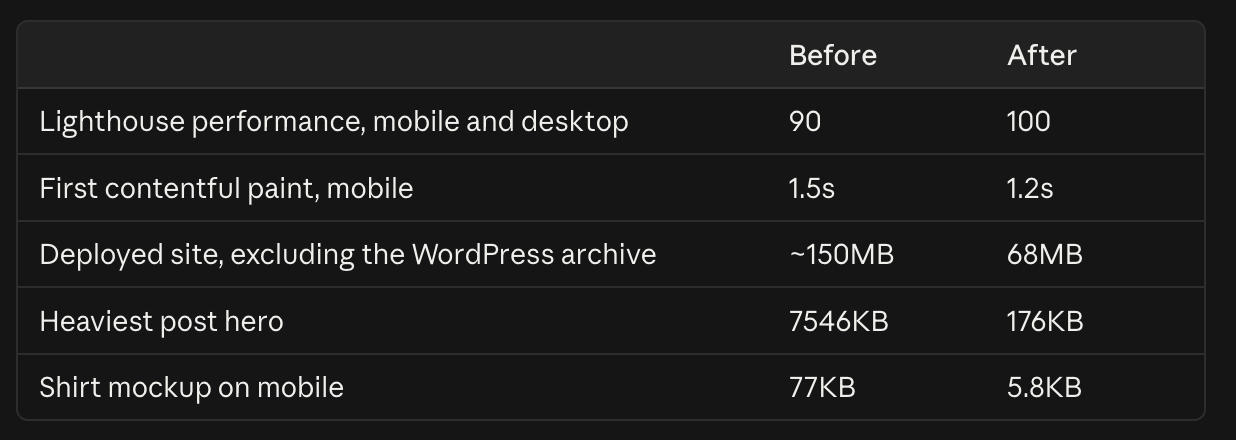
Performance was already good on Astro, so I expected a victory lap. Instead Claude went through what the site actually ships and found megabytes of images: 114MB of PNG and JPEG, one post hero weighing 7.5MB on a page whose column is 704px wide.
Everything is WebP now. A script re-encodes each image once, caps it at twice its largest displayed width, and picks quality by looking at the picture rather than the file extension, because plenty of photographs here were saved as PNG. 118MB of originals came out as 26MB, with one deliberate JPEG left where JPEG genuinely wins. The shirt mockup on the home page was 1400px and 77KB for something shown at 88px on a phone; with a srcset it costs 5.8KB there.
The fonts were the other easy win. They were coming from Google’s stylesheet, a render-blocking request to a third party worth about 780ms on mobile. Astro self-hosts both families at build time now, so there is no cross-origin round trip left before anything can paint.
Run locally, the tally looked like this, and I was pleased with myself.
The number I was actually reporting was wrong
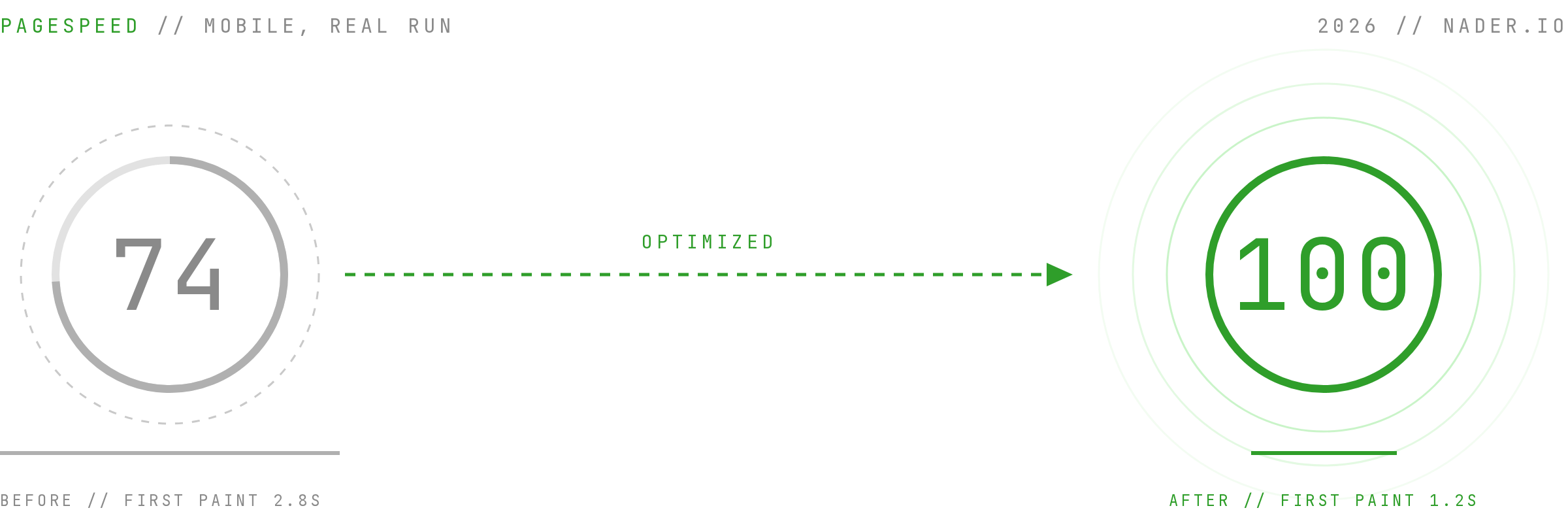
This is my favourite part. Local Lighthouse said 100. Real PageSpeed said 74 on mobile, because the sandbox running the local test could not reach third-party scripts and had been quietly measuring a site without Google Tag Manager on it.
So, the real numbers: FCP 2.8s, LCP 3.8s, and a critical path 822ms deep. Four things were sitting on it:
- The stylesheet was render-blocking and cost a round trip of its own, 465ms for 8.9KB. It is inlined into the document now.
- The font preload put 31KB at top priority and was the single longest item on the path. Dropped. The faces swap in behind metric-matched fallbacks instead.
- The WebMCP client is 20KB and does nothing in a browser without the API. It is behind a feature check now, so the injected script is 1.5KB.
- Google Tag Manager is 165KB. It loads on the load event or the first interaction, whichever comes first. The queue is set up immediately, so the pageview is still recorded and replayed when the library arrives.
That took the bytes before first paint from 23KB to 15KB, across two requests instead of three, with nothing render-blocking left.
One more fix was on the hosting side rather than in the code: a single header rule in the Render dashboard, Cache-Control: public, max-age=31536000, immutable on /_astro/*. That is a dramatic difference for anyone who visits more than one page, and it is safe precisely because Astro gives every asset a new hash on each deploy, so a cached file can never go stale. Change a file and it becomes a different URL.

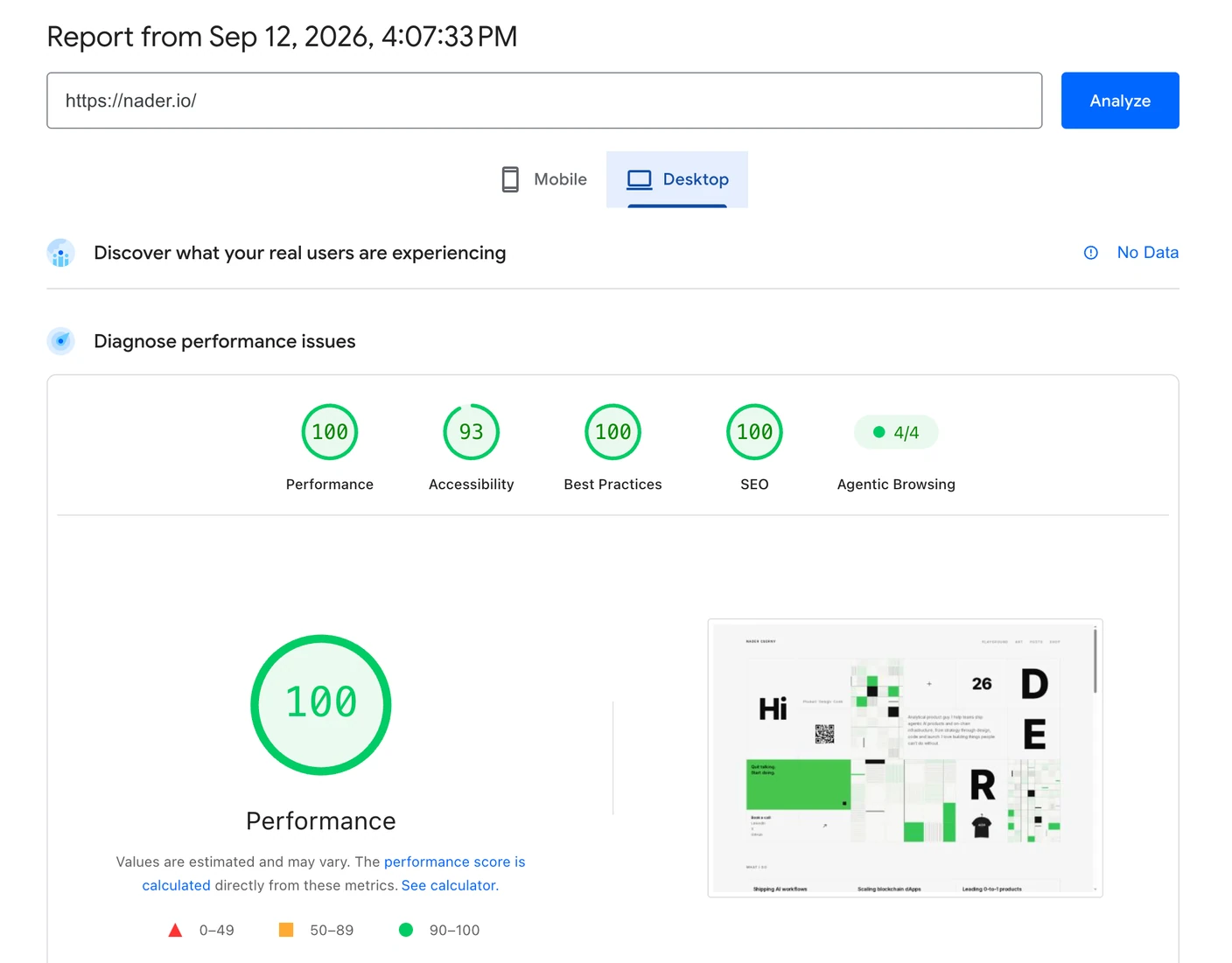
The same PageSpeed run, before and after, both on mobile:
| Before | After | |
|---|---|---|
| Performance | 74 | 100 |
| Accessibility | 94 | 93 |
| Best Practices | 100 | 100 |
| SEO | 92 | 100 |
| Agentic Browsing | 4/4 | 4/4 |
Mobile FCP is 1.2s now, and the one point Accessibility lost on the way is on my list. The deployed site, leaving out the old WordPress archive that nobody should touch, went from about 150MB to 68MB, and then to 63MB once a second pass caught the optimiser quietly re-encoding every image a second time. Desktop is 100 too.
The AIO half
PageSpeed now reports Agentic Browsing alongside the usual four. That row is the one thing in the table that did not move, and I am quite happy about it: 4/4 before and after, because the work behind it was already done. An llms.txt tells a model what this site is and where everything lives. WebMCP tools let an agent call the site instead of scraping it. There is an RSS feed, and markup plain enough to read without JavaScript.
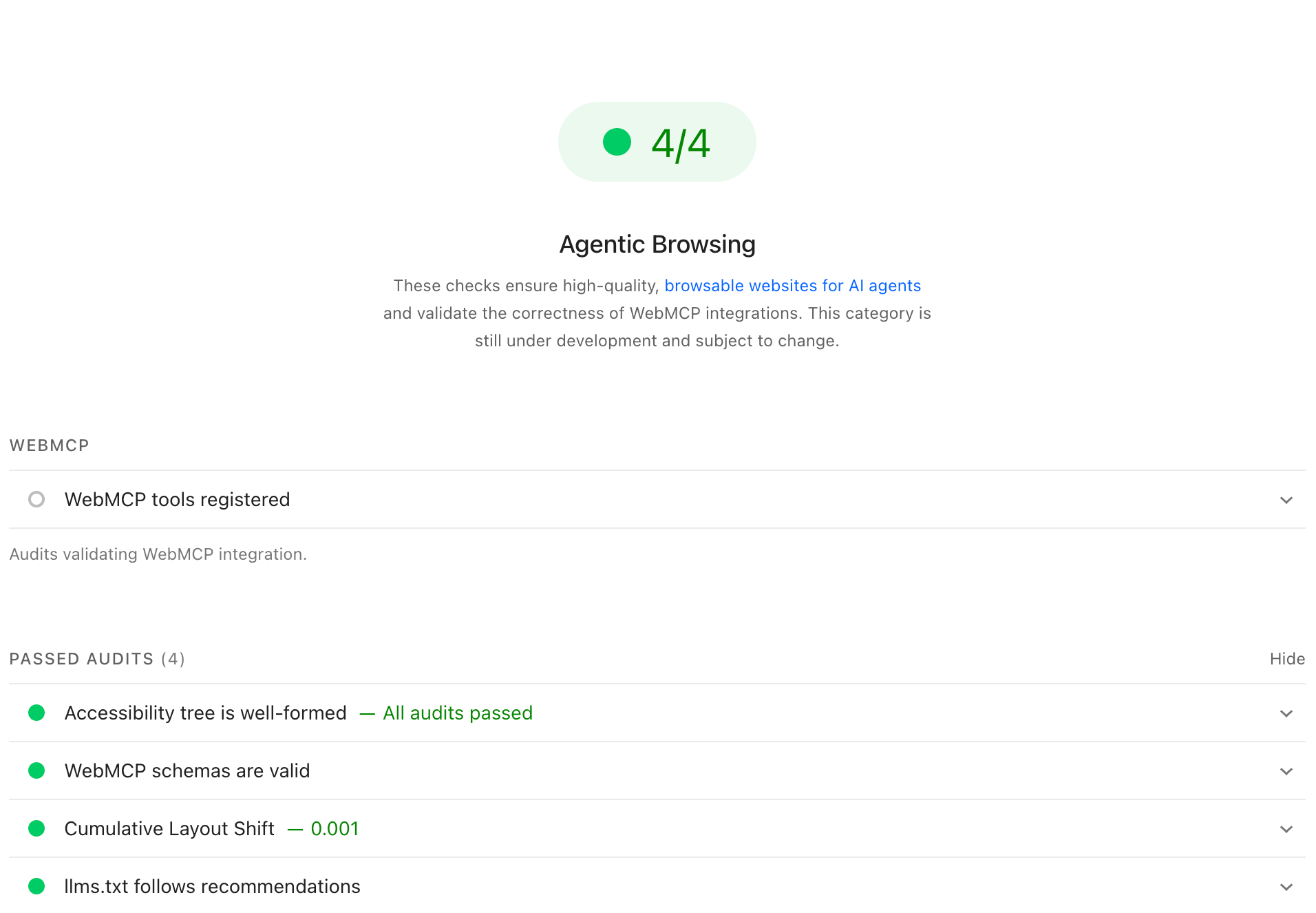
What did move is everything underneath it. SEO went from 92 to 100, every image now carries its real dimensions so nothing shifts while a page loads, and a third-party widget that used to pop up over the content is gone.
It turns out that optimizing for machines and optimizing for people are mostly the same job. Fewer bytes, clearer structure, no surprises.
What this actually felt like
Every change went up as a PR with a preview on Render, so I could click through the real thing before deciding, then merge to production when I was happy. Two evenings, mostly spent reading and looking rather than typing.
I still remember optimizing WordPress and Drupal sites: the caching plugins, the sprite sheets, the image tooling, the afternoons spent on updating. OMG. That was days of work and none of it was fun.
This was fun.